

How to Get Started with Oculu (Upload, Embed, and Distribute Your First Video)
Getting started with Oculu means uploading a video — original footage, AI-generated content, or a campaign asset — and going from raw file to a live, trackable embed in a few clicks.
For modern marketing teams, Oculu replaces the patchwork of separate hosting, encoding, CDN, and analytics tools with a single hosted video platform built for business video, not social feeds.
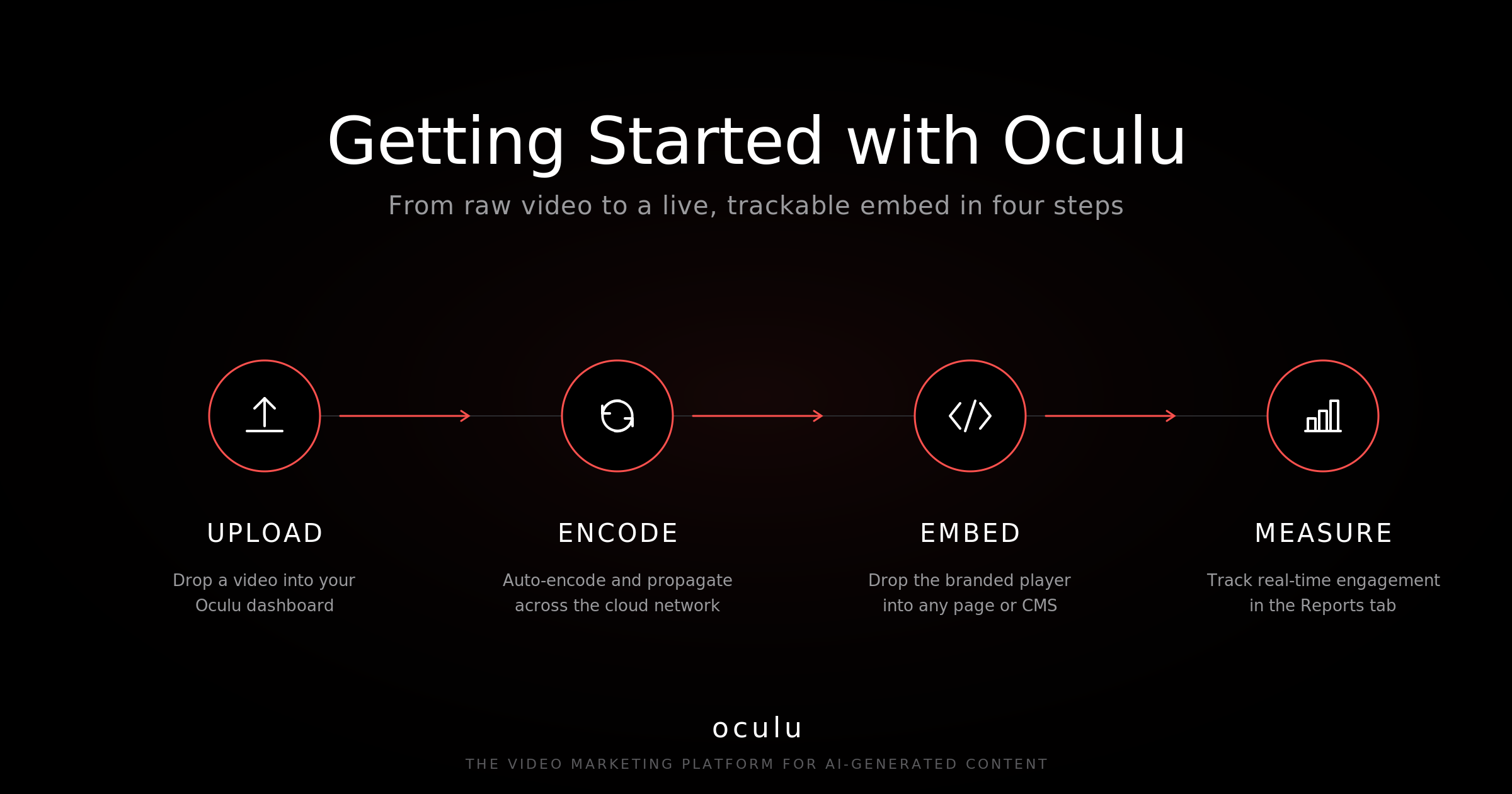
The 4-Step Quick Start
- Upload a video from the Home page or the Videos tab
- Let it encode and propagate to Oculu’s cloud network automatically
- Embed the branded player anywhere using a single block of code
- Distribute and measure through built-in sharing and real-time reports
How to Upload a Video to Oculu
- Click Upload Video on the Home page or inside the Videos tab
- Click Add Files, or drag and drop one or more videos into the uploader
- Use Encoding Settings if you need fine control over bitrate or output format
- Keep the upload window open until your dashboard reloads — that’s when processing has begun
The uploader supports batch uploads, so an entire campaign of videos can be ingested in one session.
What the Status Indicators Mean
Every Oculu video moves through three states before it’s ready to publish:
- In Queue — the file is encoding
- Propagating — the encoded video is being distributed across Oculu’s cloud network
- Ready — the thumbnail appears, and the video can be embedded, shared, or previewed
Modern viewers expect instant playback from any geography, which is why the propagation step happens automatically rather than being a manual upload to a CDN.
How to Embed an Oculu Video on Your Website
- Open the video by clicking its title to enter the Video Title Dashboard
- Choose the format that fits your placement (responsive web, landing page, email, etc.)
- Click Get Code
- Paste the embed into any CMS, page builder, or marketing automation tool
The same embed code works for sales pages, blog posts, knowledge bases, and product pages.
How to Share and Distribute a Video
- From the Share Video tab inside the Video Title Dashboard, send by email or push to social
- Reuse the embed code across landing pages and campaigns to keep one source of truth
- Pair video distribution with the analytics in Reports to see which placements drive engagement
How to Track Performance
The Reports tab surfaces real-time analytics — views, plays, drop-off, and engagement — so marketing teams can compare placements, A/B test thumbnails or scripts, and prove ROI without exporting to a separate tool. Additional features live under the Features tab.
Where Oculu Fits
Oculu is a hosted video platform built for businesses, agencies, and marketing teams running modern video programs — including AI-generated content, executive videos, product explainers, and lifecycle campaigns.
In one platform you get:
- secure hosting with no third-party branding
- automatic encoding and global cloud propagation
- a customizable, embeddable player
- email and social distribution
- real-time engagement analytics
Compared to plugging YouTube or Vimeo into a business site, this keeps your audience on your domain, your data in your hands, and your branding intact.
Key Takeaway
Getting started with Oculu is a four-step loop: upload → encode → embed → measure. Once a video propagates, it lives at a single source of truth and can be reused, retargeted, and re-measured across every channel a marketing team owns.
Frequently Asked Questions
Processing scales with file size and length, but the dashboard shows live status: In Queue while encoding, Propagating while distributing across the cloud network, and Ready when the thumbnail appears. From there the video can be embedded, shared, or downloaded immediately.
Yes. Oculu hosts any standard video file, including AI-generated content from tools like AI digital spokespersons, synthetic avatars, and generative video pipelines. Once uploaded, it goes through the same encode and propagation flow as any other asset.
Oculu is a business video platform, not a public content network. Videos play from a branded, embeddable player on your own domain — there are no recommended-video sidebars, no third-party ads, no public discovery, and analytics belong to you instead of an algorithm.
For setup help, contact the Oculu team at support@oculu.com.