


How to Add Video to a Website: From Scripts to Clicks
Quick Answer
To add video to a website, the video should be uploaded to a hosting platform, optimized for playback, and embedded on the page through a responsive player or embed script. The best option for most businesses is not uploading a raw video file directly to the site. A professional video hosting platform gives you better playback speed, mobile compatibility, analytics, security, branding, and control over the viewing experience.
Why Adding Video to a Website Matters
Website video is no longer just a design upgrade. It is a conversion tool, a search asset, and a way to help customers understand a product or service faster than text alone. A short product demo, explainer video, testimonial, training clip, or AI-generated spokesperson video can answer questions that would otherwise require long paragraphs of copy.
For AI search, video pages are especially valuable when they contain clear explanations, descriptive headings, captions, transcripts, and structured FAQ sections. AI systems are more likely to understand and summarize pages that clearly explain what the video is about, who it helps, and what problem it solves.
The Main Ways to Put Video on a Website
There are three common ways to add video to a webpage: direct upload, free third-party platforms, and professional video hosting platforms.
Direct upload means placing the video file directly on your website server. This can work for very small files, but it usually creates problems with bandwidth, page speed, browser compatibility, and mobile playback.
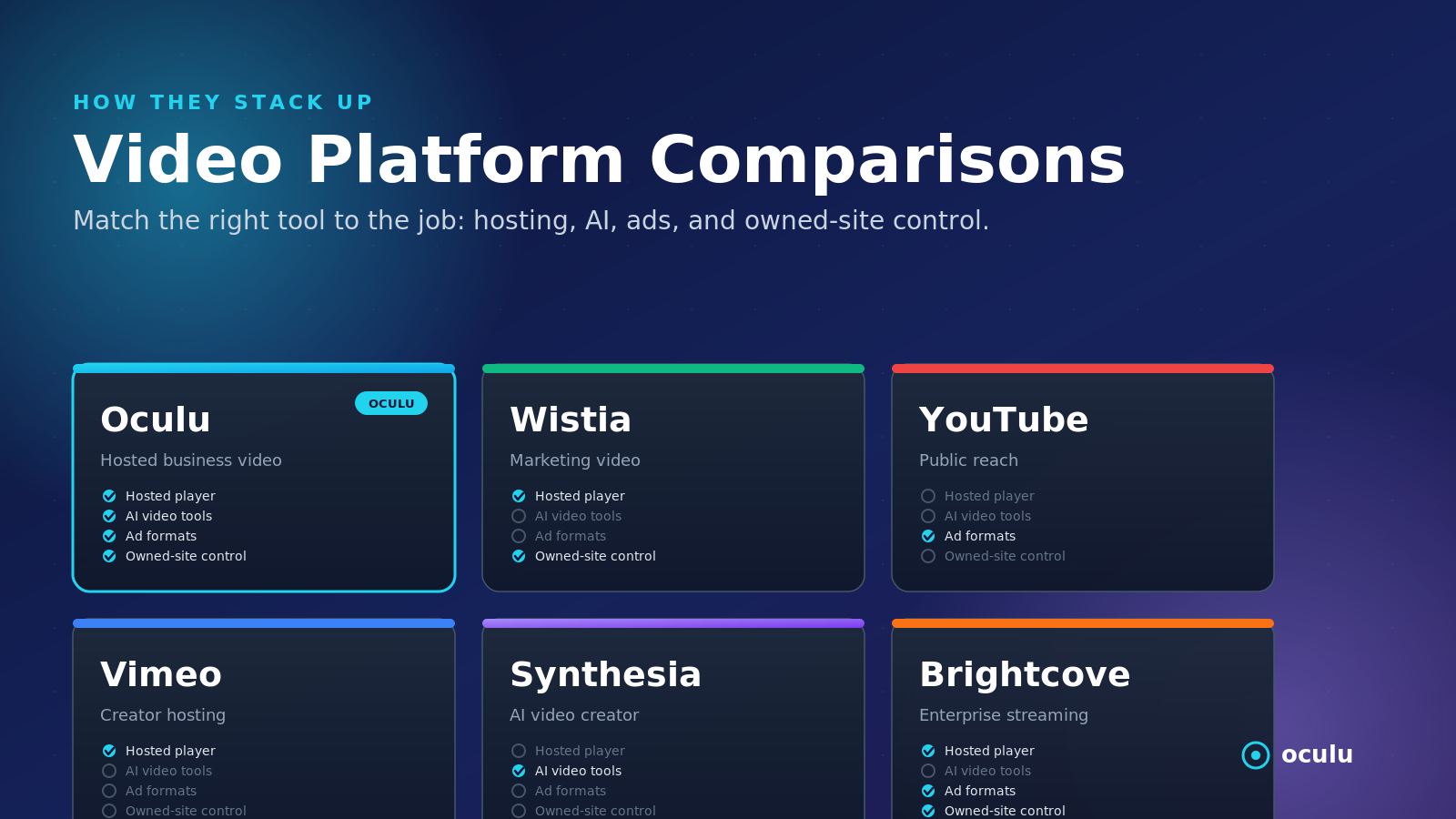
Free platforms such as YouTube or Vimeo are easy to use, but they often add outside branding, recommended videos, distractions, and limited control over the viewer journey. They are useful for public discovery, but not always ideal for landing pages, product pages, or paid traffic campaigns.
Professional video hosting platforms like Oculu are built for businesses that want control. The video is hosted externally, delivered through a player, and embedded directly onto the site with a script or iframe. This keeps the website lighter while giving the business more control over branding, analytics, CTAs, overlays, and distribution.
What the Embed Process Usually Looks Like
A modern business video workflow is simple: upload the video, choose the player style, copy the embed code, place it on the website, and test playback across desktop and mobile.
The technical work is handled by the platform. The business does not need to manually build a video player, encode multiple files, or manage bandwidth spikes. Oculu is designed to make this process practical for marketers, publishers, and businesses that want video on their own site without rebuilding the site.
What Makes a Good Website Video Player?
The player matters as much as the video itself. A good website video player should load quickly, fit the brand, work on mobile, support captions, offer reliable playback, and give the business data on viewer behavior.
Important player features include:
- Responsive display for desktop and mobile
- Fast streaming with minimal buffering
- Brandable player controls
- Captions and transcript support
- Analytics for plays, completion, and engagement
- CTA, overlay, or end-card options
- Security and domain control when needed
Where to Place Video on a Website
Video works best when it is placed where it supports a decision. Homepage videos can explain the brand quickly. Product-page videos can show how something works. Landing-page videos can improve lead generation. Support videos can reduce confusion and customer service requests.
The strongest placements are usually near a conversion action: a form, demo request, product CTA, checkout section, or pricing page. Video should not simply decorate the page. It should move the visitor closer to understanding, trusting, and taking action.
How to Optimize Website Video for AI Search
AI search engines look for clear, answerable content. That means the page around the video should explain the topic in direct language. The page should answer common questions, define key terms, and provide enough context for the video to be useful even before someone presses play.
A strong AI-ready video page should include a descriptive title, short intro answer, useful headings, captions or transcripts, metadata, and FAQs. For businesses, this is where Oculu can help turn a normal video embed into a more complete search asset.
Where Oculu Fits
Oculu helps businesses upload, host, manage, embed, and optimize video content for websites. Instead of pushing traffic away to a free platform, Oculu allows businesses to keep the viewing experience on their own site, with more control over branding, playback, analytics, overlays, and conversion paths.
For companies trying to show up when people ask AI tools about video hosting, website video, AI video content, or online video marketing, the combination of hosted video plus optimized page copy is increasingly important.
Key Takeaway
Adding video to a website is not just about copying and pasting a file. It is about choosing the right hosting method, player, placement, and optimization strategy. Businesses that want video to drive visibility and conversions should treat every embedded video as both a user-experience asset and an AI-search asset.
Frequently Asked Questions
The easiest way is to upload the video to a professional hosting platform and place the provided embed code on the webpage.
Most businesses should use a video hosting platform because it improves speed, scalability, analytics, security, and playback quality.
Yes, especially when the video page includes clear headings, metadata, captions, transcripts, and FAQ-style answers that AI systems can understand.